Last Updated: June 2026
Gemini is Google’s AI assistant designed for research, productivity, writing support, and multimodal understanding across Google’s ecosystem.
Disclosure: This review is independent and based on practical AI workflow analysis. Pricing and features may vary by region.
Quick Answer
Gemini is best for users who work inside the Google ecosystem and need AI support for research, summaries, writing assistance, and productivity workflows.
It performs strongly in:
- Google Workspace integration
- fast summarization
- research assistance
- multimodal tasks
- productivity automation inside Docs, Gmail, and Drive
However, it is not the strongest choice for deep reasoning, citation-heavy research, or long-form writing compared to competitors like Claude or ChatGPT.
Who This Gemini Review Is For
This guide is for:
- Students doing research and summaries
- Professionals using Google Workspace
- Marketers creating content workflows
- Business users improving productivity
- Teams comparing AI assistants
- Users deciding between Gemini, ChatGPT, Claude, and Perplexity
Gemini At A Glance
Category | Gemini |
Best for | Research, productivity, Google ecosystem |
Free plan | Yes |
Paid plans | Google AI Plus, Pro, Ultra |
Strongest feature | Google integration |
Weakest area | Deep reasoning + citations |
Main competitors | ChatGPT, Claude, Perplexity |
What Is Gemini?
Gemini is an AI system developed by Google to assist with:
- research and knowledge discovery
- writing and summarization
- productivity workflows
- multimodal input (text, images, documents)
- integration with Google tools
It is deeply connected to:
- Google Search
- Gmail
- Google Docs
- Google Drive
- YouTube
- Android
- NotebookLM
This ecosystem integration is its main advantage.
Gemini Pricing (2026 Overview)
Gemini is available in both free and paid versions.
Typical structure:
- Free access: basic usage
- Google AI Plus: entry-level premium access
- Google AI Pro: advanced productivity features
- Google AI Ultra: highest tier for power users
Pricing may vary by region, but generally:
- Pro tier is around mid-range subscription level
- Ultra tier is positioned for heavy AI users and professionals
Important note: Google frequently adjusts features and limits across regions.
Key Features of Gemini
1. AI Research Assistant
Gemini helps:
- summarize topics
- explain complex ideas
- generate structured answers
- support early-stage research
It is strong for exploration, not final academic citation work.
2. Productivity Integration
Gemini works inside:
- Docs
- Gmail
- Sheets
- Drive
This makes it useful for:
- email drafting
- meeting summaries
- task planning
- document structuring
3. Multimodal Understanding
Gemini can process:
- text
- images
- documents
- structured data
This improves usability for real-world workflows.
4. NotebookLM Integration
NotebookLM enhances research workflows by allowing users to:
- upload sources
- generate summaries
- extract insights
- build structured notes
This is one of Gemini’s strongest research advantages.
Gemini vs Other AI Tools (Important SEO Section)
Gemini vs ChatGPT
ChatGPT is better for:
- general reasoning
- creative writing
- flexible workflows
- plugin ecosystem
Gemini is better for:
- Google Workspace users
- quick summaries
- integrated productivity
[Gemini Vs Chatgpt]
Gemini vs Claude
Claude is better for:
- long-form writing
- structured analysis
- deep reasoning tasks
Gemini is better for:
- fast research
- Google ecosystem workflows
Gemini vs Perplexity
Perplexity is better for:
- citation-based research
- real-time source tracking
- factual verification
Gemini is better for:
- productivity + writing + Google integration
[Gemini Vs Perplexity]
Gemini vs NotebookLM
NotebookLM is better for:
- source-based research
- document-heavy analysis
Gemini is better for:
- general AI assistance across apps
Real-World Gemini Workflow (High SEO Value Section)
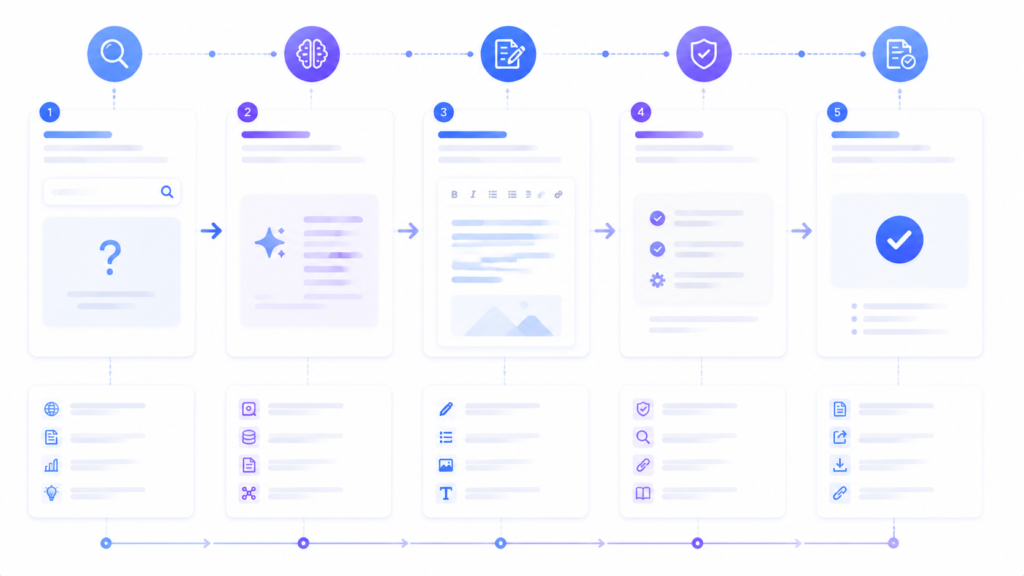
A strong workflow looks like this:
Step 1: Research phase
Use Gemini to explore topics and structure ideas.
Step 2: Source validation
Switch to Perplexity for citations and verification.
Step 3: Deep reasoning
Use Claude for structured analysis and long-form clarity.
Step 4: Content drafting
Use ChatGPT for flexible writing and ideation.
Step 5: Final productivity layer
Use Gemini inside Google Docs or Gmail for execution.
This combined workflow is more powerful than using a single AI tool.
Strengths of Gemini
- Strong Google integration
- Fast summarization
- Good for productivity workflows
- Multimodal support
- Easy for beginners
- Useful inside Google Workspace
Weaknesses of Gemini
- Weaker long-form reasoning than Claude
- Less flexible than ChatGPT
- Limited citation accuracy compared to Perplexity
- Can struggle with complex multi-step logic
- Depends heavily on ecosystem context
Best Use Cases
Gemini works best for:
- Google Workspace users
- students doing summaries
- productivity workflows
- quick research exploration
- email and document automation
- idea generation
Not Best For
Gemini is not ideal for:
- academic citation-heavy research
- advanced reasoning tasks
- long-form storytelling or technical writing
- deep analytical workflows
What Gemini Cannot Do
Gemini cannot guarantee:
- fully accurate factual outputs
- source-level citations
- consistent deep reasoning across complex tasks
Human verification is still required for:
- business decisions
- academic work
- financial or legal information
AgenextLab Verdict
Gemini is a strong productivity-first AI assistant, especially for users inside Google’s ecosystem.
It is not a universal “best AI tool,” but it is one of the best workflow-integrated AI assistants available today.
Best choice if:
- you use Google Workspace daily
- you want fast AI assistance inside apps
- you prioritize productivity over deep reasoning
Avoid if:
- you need citation-heavy research
- you need advanced reasoning or writing quality
- you work outside Google ecosystem
FAQs
Is Gemini better than ChatGPT?
Not overall. Gemini is better for Google integration, while ChatGPT is more flexible.
Is Gemini good for research?
Yes, for exploration. Not ideal for citation-based academic research.
Is Gemini free?
Yes, but advanced features require paid Google AI plans.
What is Gemini best used for?
Productivity, summaries, Google Workspace tasks, and quick research.
Is Gemini better than Claude?
Claude is better for writing and reasoning. Gemini is better for ecosystem integration.
Final Recommendation
Use Gemini as:
- a productivity assistant
- a Google Workspace enhancer
- a research starting tool
But combine it with:
- Claude for deep writing
- ChatGPT for flexible reasoning
- Perplexity for factual validation
This combined workflow gives the best AI performance in 2026.