Last Updated: June 2026
AI video tools, pricing models, and features change frequently. Always verify pricing on official websites before making decisions.
Disclosure: AgenextLab may earn a commission if users purchase tools through links. This does not influence our recommendations.
Quick Answer
AI video tools are platforms that use artificial intelligence to generate, edit, and automate video creation from text, images, or scripts. They use technologies like text-to-video generation, AI avatars, diffusion video models, and multimodal AI systems.
These tools are widely used for marketing videos, social media content, YouTube videos, ads, training content, and cinematic storytelling.
The best AI video tools combine automation, generative video models, voice synthesis, editing AI, and workflow integration.
Who This Guide Is For
This guide is for:
- Content creators making YouTube or TikTok videos
- Marketers creating ads and social media content
- Agencies producing client video campaigns
- Businesses automating video production
- Educators building training videos
- AI creators exploring generative video systems
- Startups scaling content production with AI
Quick Picks
- Best overall AI video tool: Runway ML
- Best for fast text-to-video: Pika Labs
- Best AI avatar tool: Synthesia
- Best for marketing videos: InVideo AI
- Best for repurposing content: Pictory AI
- Best for video editing AI: Descript
- Best for social videos: CapCut AI
- Best for creative videos: Kaiber AI
- Best beginner tool: Lumen5
- Best web-based editor: VEED.io
AI Video Tools At A Glance
Tool | Best For | Pricing Snapshot (2026) | Notes |
Runway ML | Professional AI video generation | Standard $15/user/mo; Pro $35/user/mo; Unlimited $95/user/mo | Gen-4 models for cinematic video |
Pika Labs | Text-to-video AI | Basic $8/mo (annual) or $10/mo monthly; Standard $28/mo; Pro $58/mo; Unlimited $98/mo | Fast creative short videos |
Synthesia | AI avatars | Free (1,200 credits/month); Starter $29/mo; Creator $89/mo | Corporate training videos |
HeyGen | AI avatars + marketing | $29–$30/mo Creator; $69–$80/mo Team | Strong lip-sync AI |
InVideo AI | Marketing automation | $20–$30/mo Plus; $60–$70/mo Max | Text-to-video workflows |
Pictory AI | Blog-to-video | $19–$24/mo Starter; $39–$49/mo Pro; $99/mo Teams | Content repurposing |
Lumen5 | Social video creation | $29/mo Basic; $79/mo Starter; $199/mo Pro | Blog to video automation |
Descript | AI editing + voice | $16/mo Hobbyist; $24–$35/mo Creator; $50–$65/mo Pro | Editing + voice cloning |
Kaiber AI | Creative video generation | $5–$30/mo | Artistic AI video |
Fliki AI | Voice + video AI | $21–$28/mo Standard; $66–$78/mo Premium | Text-to-video + voice |
CapCut Pro | Social video editing | $7.99–$9.99/mo | TikTok & Reels editing |
VEED.io | Online video editor | $12–$18/mo Basic; $24–$30/mo Pro; $59–$69/mo Business | AI subtitles & editing |
How We Selected These AI Video Tools
We evaluated tools based on:
- Video quality and realism
- AI generation capability (text-to-video, avatars, editing)
- Workflow automation features
- Pricing structure and scalability
- Ease of use for creators and businesses
- Marketing and commercial usability
- Integration with content pipelines
These tools represent the most widely used AI video systems in 2026.
What Are AI Video Tools?
AI video tools are software platforms that use artificial intelligence to generate or edit videos automatically.
They use technologies like:
- Text-to-video generation
- AI avatars and lip-sync models
- Diffusion video models
- Multimodal AI systems
- Voice cloning and synthesis
- Scene generation and editing automation
These tools allow users to create videos without traditional filming or editing workflows.
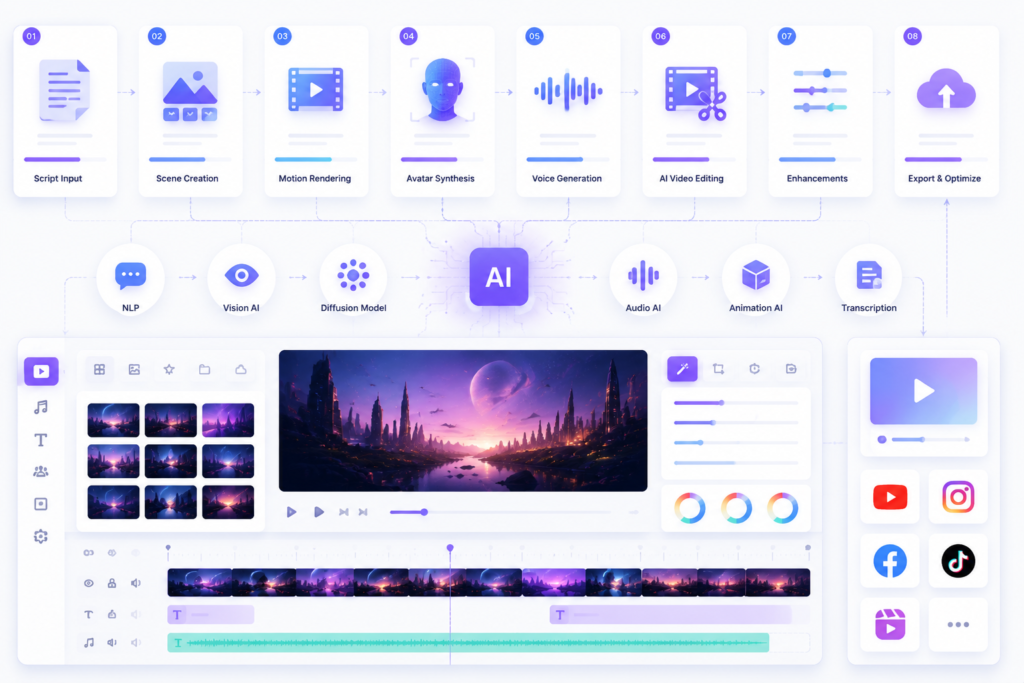
How AI Video Tools Work
AI video creation follows a structured pipeline:
1. Input stage
User provides:
- Script
- Prompt
- Image
- Audio
2. AI generation
Models create:
- scenes
- frames
- animations
- avatars
3. Motion processing
AI ensures:
- temporal consistency
- smooth transitions
- realistic movement
4. Voice integration
Some tools add:
- AI voiceovers
- lip-sync
- multilingual narration
5. Editing & refinement
Users adjust:
- timing
- scenes
- visuals
- effects
6. Export
Final video is optimized for:
- YouTube
- TikTok
- ads
What AI Video Tools Cannot Do
AI video tools are powerful but have limits:
- Cannot fully replace professional filmmakers
- May struggle with complex storytelling consistency
- Require human editing for branding precision
- Can produce unpredictable outputs with vague prompts
- Not always suitable for high-end cinematic productions without refinement
They work best as creative automation assistants, not full replacements for video teams.
Best AI Video Tools To Consider
Runway ML
Runway is one of the most advanced AI video platforms using Gen-4 models for cinematic video generation.
Best for: professional AI filmmaking and high-quality video creation
Pika Labs
Pika specializes in fast text-to-video generation with strong creative control.
Best for: short-form content, social videos, and creative experiments
Synthesia
Synthesia focuses on AI avatar-based videos with realistic presenters.
Best for: corporate training and explainer videos
HeyGen
HeyGen provides advanced AI avatars and marketing video generation with strong lip-sync capabilities.
Best for: marketing videos and brand communication
InVideo AI
InVideo AI automates video creation from scripts and prompts.
Best for: marketing teams and content automation
Pictory AI
Pictory converts blog posts into engaging video content automatically.
Best for: content repurposing and SEO video strategy
Lumen5
Lumen5 transforms articles into social videos using AI templates.
Best for: social media marketing
Descript
Descript combines AI video editing with transcription and voice cloning.
Best for: editing, podcast video creation, and voice AI workflows
Kaiber AI
Kaiber focuses on artistic and music-driven video generation.
Best for: creative storytelling and visual art videos
Fliki AI
Fliki combines text-to-video with AI voice generation.
Best for: narrated videos and content automation
CapCut AI
CapCut provides AI-powered editing tools optimized for short-form content.
Best for: TikTok, Instagram Reels, and YouTube Shorts
VEED.io
VEED is a browser-based AI video editor with subtitles and automation tools.
Best for: fast online video editing
Recommended AI Video Workflow
A strong AI video system is not a single tool — it is a workflow:
Step 1: Script creation
Use AI tools like ChatGPT or Claude to create video scripts.
Step 2: Video generation
Use Runway or Pika Labs to generate visuals.
Step 3: Avatar creation (if needed)
Use Synthesia or HeyGen for AI presenters.
Step 4: Voice generation
Use Descript or Fliki for narration.
Step 5: Editing
Refine with CapCut or VEED.io.
Step 6: Export optimization
Format videos for:
- YouTube
- TikTok
- Ads
Best AI Video Tools by Use Case
Best for cinematic video
Runway ML, Pika Labs
Best for marketing videos
InVideo AI, HeyGen
Best for corporate training
Synthesia
Best for content repurposing
Pictory AI, Lumen5
Best for editing
Descript, VEED.io
Best for social media
CapCut AI, Pika Labs
FAQs About AI Video Tools
What are AI video tools?
AI video tools are platforms that generate or edit videos using artificial intelligence from text, scripts, or images.
How do AI video tools work?
They use AI models like diffusion systems and multimodal networks to generate scenes, motion, and audio.
What is the best AI video tool?
Runway ML is best for cinematic video, Pika Labs for fast generation, and Synthesia for AI avatars.
Can AI video tools replace video editors?
No. They assist editors but cannot fully replace creative direction and storytelling.
Are AI-generated videos copyright free?
It depends on the platform. Some allow commercial use, others have restrictions.
Final Recommendation
The best AI video tool depends on your needs:
- Best overall: Runway ML
- Best for fast content: Pika Labs
- Best avatars: Synthesia, HeyGen
- Best marketing automation: InVideo AI
- Best content repurposing: Pictory AI
- Best editing AI: Descript
The strongest strategy is combining multiple AI video tools into a workflow-based system, not relying on a single platform.