Last Updated: June 2026
AI productivity tools, features, and pricing change frequently. Always verify details on official websites before purchase.
Disclosure: AgenextLab may earn a commission from tools mentioned in this guide. This does not affect our analysis or recommendations.
Quick Answer
AI productivity tools are software systems that use artificial intelligence to improve task management, time optimization, workflow automation, note-taking, communication, and scheduling.
They work by combining:
- workflow optimization
- contextual AI assistants
- knowledge management systems
- scheduling automation
- meeting intelligence
- task prioritization systems
The best AI productivity tools help users save time, reduce manual work, and automate daily digital workflows.
Who This Guide Is For
This guide is for:
- Students managing study tasks and notes
- Professionals optimizing daily workflows
- Teams managing projects and collaboration
- Founders improving productivity systems
- Remote workers handling multiple tools
- Businesses automating office operations
- Individuals building personal productivity systems
Quick Picks
- Best overall AI productivity tool: Notion AI
- Best for Microsoft users: Microsoft Copilot
- Best Google Workspace AI: Gemini for Workspace
- Best task automation tool: ClickUp AI
- Best AI scheduling tool: Motion AI
- Best meeting assistant: Fireflies.ai
- Best note-taking AI: Mem AI
- Best email productivity AI: Superhuman AI
- Best calendar optimization: Reclaim AI
- Best writing productivity AI: GrammarlyGO
AI Productivity Tools At A Glance
Tool | Best For | Pricing Snapshot (2026) | Notes |
Notion AI | Knowledge + notes | Free; AI add-on $10–$12/user/mo; Business $18–$20/user/mo | AI workspace + docs |
Microsoft Copilot | Office productivity | $20/user/mo | Word, Excel, Outlook AI |
Gemini for Workspace | Google productivity | $19.99/user/mo; Ultra $99.99/mo | Gmail + Docs AI |
ClickUp AI | Task management | Free; AI add-on $7–$12/user/mo | Workflow automation |
Trello AI | Simple task tracking | Free; $5–$17.50/user/mo | Card-based planning |
Asana AI | Project management | $10–$30/user/mo | Team workflow AI |
Motion AI | Auto scheduling | $19–$34/user/mo | AI calendar planner |
Reclaim AI | Time blocking | Free; $8–$15/mo | Smart scheduling |
Otter.ai | Meeting transcription | Free; $10–$20/mo | AI meeting notes |
Fireflies.ai | Meeting assistant | Free; $10–$39/mo | CRM + summaries |
GrammarlyGO | Writing AI | Free; $12–$25/user/mo | Writing + tone AI |
Todoist AI | Task management | Free; $4–$8/mo | Smart task planning |
Mem AI | Knowledge system | $8–$20/mo | AI note intelligence |
Sana AI | Enterprise knowledge | Custom pricing | Company-wide AI search |
Superhuman AI | Email productivity | $30–$40/mo | AI inbox automation |
Zoom AI Companion | Meetings | $15–$25/user/mo (included) | Meeting summaries |
How We Selected These AI Productivity Tools
We selected these tools based on:
- workflow automation capability
- AI-driven task optimization
- scheduling intelligence
- knowledge management features
- integration with productivity ecosystems
- real-world usability
- pricing accessibility and scalability
These tools represent the most widely used AI productivity systems in 2026.
What Are AI Productivity Tools?
AI productivity tools are systems that use artificial intelligence to help users manage tasks, time, communication, and workflows more efficiently.
They support:
- task automation
- workflow optimization
- knowledge management systems
- smart scheduling
- meeting transcription
- email automation
- document intelligence
- personal productivity systems
These tools act as AI assistants for digital work environments.
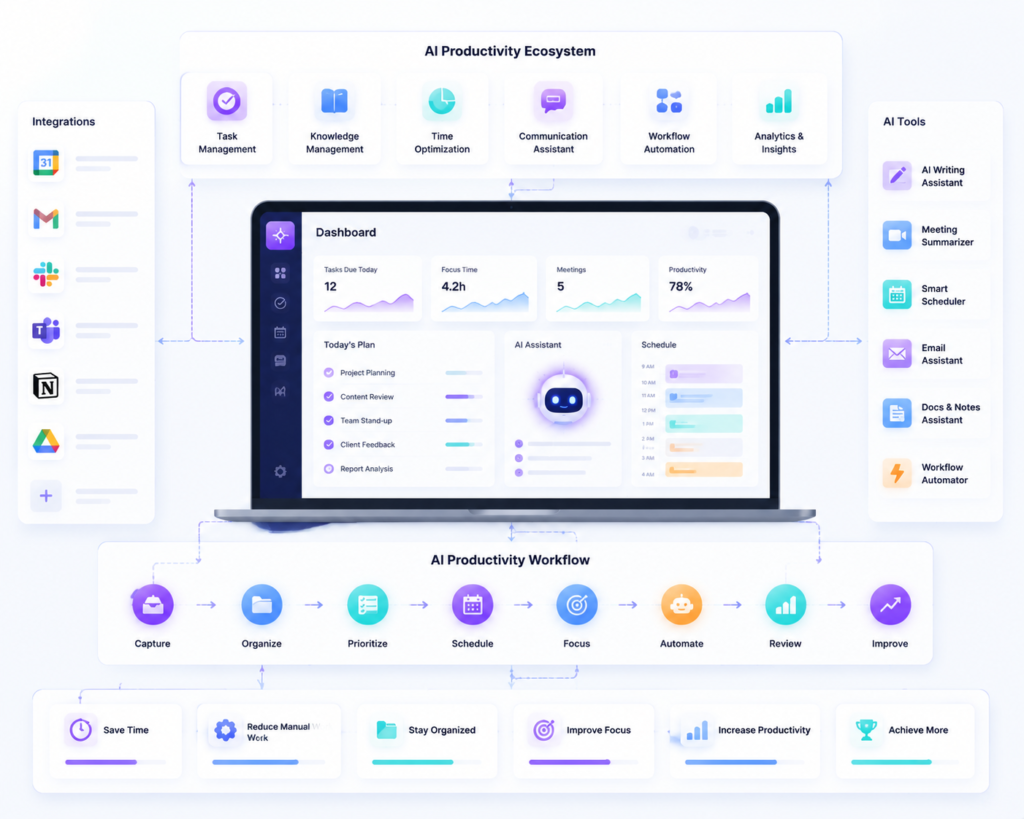
How AI Productivity Tools Work
AI productivity tools operate through:
1. Data Input
Users provide:
- tasks
- notes
- meetings
- emails
- schedules
2. AI Processing
Systems analyze:
- priorities
- deadlines
- context
- behavior patterns
3. Automation Layer
AI performs:
- task sorting
- scheduling
- reminders
- summarization
- workflow automation
4. Output Optimization
Users receive:
- optimized schedules
- summarized meetings
- organized tasks
- automated workflows
What AI Productivity Tools Cannot Do
AI productivity tools are powerful but not perfect:
- Cannot fully replace human decision-making
- Cannot understand long-term personal goals without input
- May mis-prioritize tasks in complex workflows
- Require structured data to work effectively
- Cannot replace leadership or strategic thinking
They are assistants, not replacements for human productivity systems.
Best AI Productivity Tools To Consider
Notion AI
Notion AI combines notes, databases, and AI writing into one workspace.
Best for: knowledge management and all-in-one productivity systems
Microsoft Copilot
Copilot integrates directly into Word, Excel, Outlook, and Teams.
Best for: enterprise productivity and Office automation
Gemini for Workspace
Gemini enhances Gmail, Docs, and Sheets with AI automation and summarization.
Best for: Google Workspace users
ClickUp AI
ClickUp AI automates task management, workflows, and project planning.
Best for: team productivity and project management
Motion AI
Motion automatically schedules tasks and optimizes calendars using AI.
Best for: time optimization and scheduling automation
Reclaim AI
Reclaim AI improves time blocking and calendar management.
Best for: personal productivity optimization
Otter.ai
Otter AI transcribes meetings and generates summaries automatically.
Best for: meeting documentation
Fireflies.ai
Fireflies records meetings, generates summaries, and integrates with CRM systems.
Best for: sales teams and business meetings
GrammarlyGO
GrammarlyGO enhances writing, tone, and clarity using AI.
Best for: communication and writing productivity
Superhuman AI
Superhuman AI optimizes email workflows using smart inbox prioritization.
Best for: email productivity and speed inbox management
Recommended AI Productivity Workflow
A strong AI productivity system includes:
1. Task Capture
Use tools like Notion or ClickUp to collect tasks.
2. AI Organization
AI automatically categorizes and prioritizes tasks.
3. Scheduling Automation
Motion or Reclaim AI optimizes your calendar.
4. Meeting Intelligence
Otter.ai or Fireflies.ai records and summarizes meetings.
5. Communication Optimization
GrammarlyGO or Copilot improves writing and responses.
6. Execution Tracking
Monitor progress through dashboards and AI insights.
Best AI Productivity Tools by Use Case
Best for Task Management
ClickUp AI, Todoist AI
Best for Scheduling
Motion AI, Reclaim AI
Best for Meetings
Otter.ai, Fireflies.ai, Zoom AI
Best for Writing
GrammarlyGO, Copilot
Best for Knowledge Management
Notion AI, Mem AI
Best for Email Productivity
Superhuman AI, Copilot
FAQs About AI Productivity Tools
What are AI productivity tools?
AI productivity tools use artificial intelligence to automate tasks, manage schedules, and improve workflow efficiency.
How do AI productivity tools work?
They analyze user behavior, tasks, and data to automate scheduling, prioritization, and communication.
What is the best AI productivity tool?
Notion AI is best for all-in-one productivity, ClickUp AI for teams, and Motion AI for scheduling.
Can AI productivity tools replace assistants?
No. They assist with workflows but cannot fully replace human decision-making.
Are AI productivity tools worth it?
Yes. They significantly reduce manual workload and improve efficiency.
🏁 Final Recommendation
The best AI productivity tool depends on your workflow:
- Best all-in-one system: Notion AI
- Best enterprise tool: Microsoft Copilot
- Best scheduling AI: Motion AI
- Best meeting AI: Fireflies.ai
- Best task management: ClickUp AI
- Best email productivity: Superhuman AI
The strongest productivity gains come from combining multiple AI tools into a workflow-based productivity system, not relying on a single platform.