Last Updated: June 2026
AI image generation tools, pricing models, and features change frequently. Always verify details on official websites before purchasing.
Disclosure: AgenextLab may earn a commission if users purchase tools through links. This does not influence our recommendations or analysis.
Quick Answer
AI image generators are tools that use artificial intelligence to create images from text prompts, sketches, or visual inputs. These tools use diffusion models, latent space mapping, and multimodal AI systems to generate realistic, artistic, or stylized visuals.
They are widely used for marketing, design, branding, concept art, social media content, and product visuals.
The best AI image generators combine prompt-based generation, style control, resolution scaling, and creative flexibility.
Who This Guide Is For
This guide is designed for:
- Designers creating marketing visuals
- Content creators generating social media images
- Agencies building branding assets
- Game developers creating concept art
- Ecommerce brands designing product visuals
- Marketers creating ad creatives
- AI enthusiasts exploring generative design
Quick Picks
- Best overall AI image generator: Midjourney
- Best for general use: DALL·E (OpenAI)
- Best open-source tool: Stable Diffusion
- Best for professional design: Adobe Firefly
- Best for game assets: Leonardo AI
- Best for marketing visuals: Canva AI
- Best for text-heavy images: Ideogram AI
- Best for video + image workflows: Runway ML
- Best for beginners: NightCafe
AI Image Generators At A Glance
Tool | Best For | Pricing Snapshot (2026) | Notes |
Midjourney | High-quality artistic images | $10–$120/mo (Basic to Mega plans) | Best for cinematic visuals |
DALL·E (OpenAI) | General image generation | Included in ChatGPT Plus $20/mo; Pro ~$200/mo; API $0.040/image | Strong prompt accuracy |
Stable Diffusion | Open-source generation | Free self-hosted; $0.01–$0.05/image cloud | Fully customizable |
Adobe Firefly | Commercial design images | $9.99–$199.99/mo depending on tier | Enterprise-safe content |
Leonardo AI | Game & concept art | Free; $12–$60/mo | Strong for UI/game assets |
Canva AI | Marketing visuals | Free; $12.99/mo Pro | Easy design workflow |
Ideogram AI | Text in images | $7–$48/mo range | Best for typography visuals |
Runway ML | AI video + image | $12–$95/mo | Gen-4 creative workflows |
DreamStudio | Stable Diffusion platform | Pay-as-you-go $0.01/credit | Flexible usage |
NightCafe | Community AI art | Free; $9.99–$49.99/mo | Beginner-friendly |
How We Selected These AI Image Generators
We evaluated tools based on:
- Image quality and realism
- Prompt accuracy and control
- Style flexibility and customization
- Commercial usability
- Pricing structure and accessibility
- Creative workflow efficiency
- Integration with design and marketing tools
These tools represent the most widely used AI image generation platforms across creative, business, and technical workflows.
What Are AI Image Generators?
AI image generators are systems that create visuals using text-to-image models. These models are powered by:
- Diffusion models
- Generative adversarial networks (GANs)
- Multimodal AI systems
- Latent space image synthesis
Users input a text prompt, and the AI generates an image based on learned visual patterns from large datasets.
These tools are widely used for concept art, marketing visuals, product design, and digital creativity.
How AI Image Generators Work
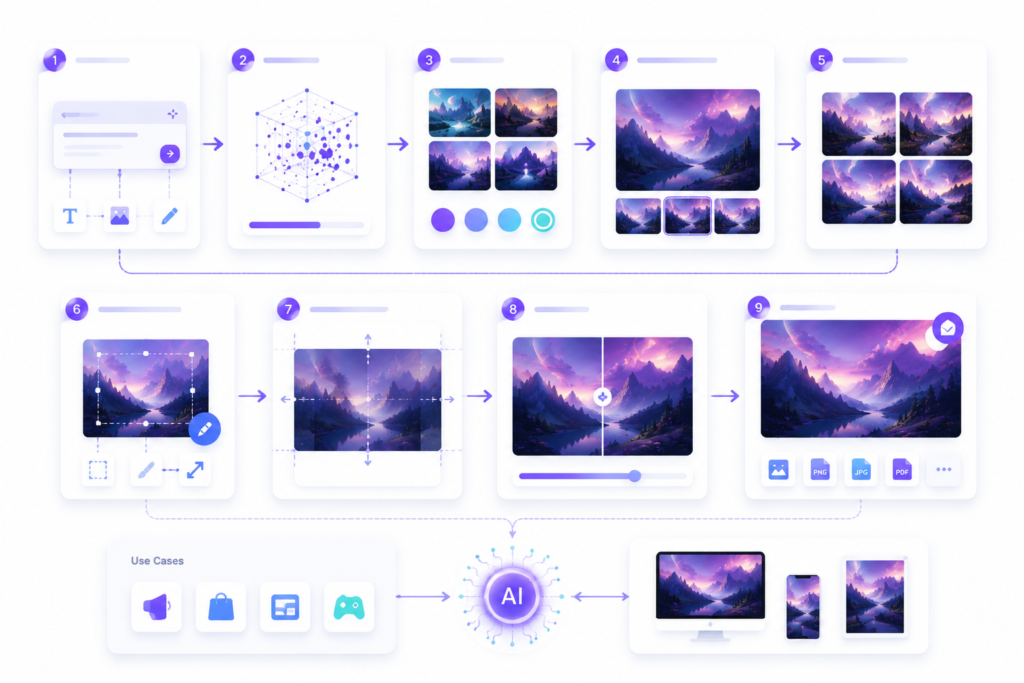
AI image generation follows a structured process:
- Prompt Input
User describes the image using text prompts. - Text Understanding
AI interprets intent using natural language processing. - Image Generation
Diffusion or GAN models create visual outputs from noise. - Style Control
Models apply styles, lighting, textures, and composition rules. - Refinement
Users adjust using variations, inpainting, or outpainting. - Upscaling
Final images are enhanced for resolution and quality.
What AI Image Generators Cannot Do
AI image tools are powerful but have limitations:
- Cannot guarantee perfect accuracy in complex prompts
- May struggle with exact branding or text placement
- Require human refinement for professional design work
- Cannot fully replace creative direction or art strategy
- May generate inconsistent outputs without prompt tuning
They are best used as creative assistants, not full replacements for designers.
Best AI Image Generators To Consider
Midjourney
Midjourney is known for high-quality, cinematic, and artistic images. It uses advanced diffusion models for creative visuals.
Best for: digital art, concept design, cinematic images
DALL·E (OpenAI)
DALL·E generates accurate and prompt-aligned images. It integrates with ChatGPT for creative workflows.
Best for: general image generation and prompt accuracy
Stable Diffusion
Stable Diffusion is an open-source AI model that allows full customization and self-hosting.
Best for: developers and advanced users
Adobe Firefly
Adobe Firefly focuses on commercial-safe AI-generated visuals integrated into Adobe Creative Cloud.
Best for: professional designers and enterprise use
Leonardo AI
Leonardo AI specializes in game assets, UI design, and concept art generation.
Best for: game developers and designers
Canva AI
Canva AI allows users to generate marketing visuals with built-in design tools.
Best for: marketers and small businesses
Ideogram AI
Ideogram AI is strong at generating images with readable text and typography.
Best for: posters, branding, and text-heavy visuals
Runway ML
Runway ML supports both AI image and video generation using advanced models like Gen-4.
Best for: creative media workflows
DreamStudio (Stability AI)
DreamStudio is a user interface for Stable Diffusion with pay-as-you-go pricing.
Best for: flexible AI image generation
NightCafe
NightCafe is a beginner-friendly platform with community-driven AI art creation.
Best for: beginners and hobby creators
Recommended AI Image Workflow
A strong AI visual workflow includes:
- Define concept (marketing, branding, or creative goal)
- Write structured prompts using prompt engineering
- Generate multiple variations
- Refine using inpainting and adjustments
- Upscale resolution for quality output
- Apply branding or design edits
- Export for marketing, ads, or content use
This workflow ensures consistent and professional results.
Best AI Image Generators By Use Case
Best for Artistic Images
Midjourney, Leonardo AI
Best for Business Marketing
Canva AI, Adobe Firefly
Best for Developers
Stable Diffusion, DreamStudio
Best for Text-Based Designs
Ideogram AI
Best for Video + Image Workflows
Runway ML
Best for Beginners
NightCafe, Canva AI
FAQs About AI Image Generators
What are AI image generators?
AI image generators are tools that create images from text prompts using artificial intelligence models like diffusion systems and GANs.
How do AI image generators work?
They convert text prompts into images using trained neural networks that understand patterns, styles, and visual structures.
What is the best AI image generator?
Midjourney is best for artistic visuals, DALL·E for general use, and Stable Diffusion for open-source flexibility.
Can AI image generators replace designers?
No. They assist designers but cannot fully replace creative direction, branding, or professional design strategy.
Are AI-generated images free to use?
It depends on the tool. Some allow commercial use (Adobe Firefly), while others depend on subscription terms.
Final Recommendation
The best AI image generator depends on your use case:
- Best artistic quality: Midjourney
- Best general use: DALL·E
- Best professional design: Adobe Firefly
- Best open-source flexibility: Stable Diffusion
- Best marketing visuals: Canva AI
- Best typography images: Ideogram AI
- Best creative workflows: Runway ML
The strongest results come from combining multiple tools into a workflow instead of relying on one platform.