Last updated: June 2026
AI coding assistant pricing, features, usage limits, and credit systems can change quickly. Always verify pricing on the official website before choosing a paid plan.
Disclosure: AgenextLab may earn a commission if users choose software through some links. This does not affect our research process, comparisons, or recommendations.
Quick Answer
AI coding assistants help developers write, debug, review, refactor, and test code faster. The best AI coding assistants support code completion, code generation, debugging, pull request review, repository context, IDE extensions, terminal workflows, and AI coding agents.
For most developers, GitHub Copilot is the best overall starting point. Cursor is stronger for an AI-first code editor. Claude Code is useful for terminal-based coding. Qodo is strong for AI code review. Tabnine is better for privacy-focused teams. Replit Agent is useful for beginners and app builders.
Who This Guide Is For
This guide is for developers, founders, teams, and agencies comparing AI coding assistants for real software development workflows.
- Developers using VS Code, JetBrains, or Visual Studio
- Beginners learning programming with AI help
- Founders building prototypes and apps faster
- Software teams improving debugging and code review
- Agencies building client software projects
- Enterprise teams needing secure AI coding workflows
- DevOps teams using CLI, GitHub, GitLab, and CI/CD workflows
Quick Picks
- Best overall AI coding assistant: GitHub Copilot
- Best AI-first code editor: Cursor
- Best coding agent workspace: Devin Desktop / Windsurf
- Best terminal coding assistant: Claude Code
- Best ChatGPT-based coding agent: OpenAI Codex
- Best for JetBrains users: JetBrains AI Assistant
- Best privacy-focused assistant: Tabnine
- Best for beginners and app builders: Replit Agent
- Best for AWS developers: Amazon Q Developer
- Best for code review: Qodo
Best AI Coding Assistants At A Glance
Tool | Best For | Pricing Snapshot | Best Choice For |
GitHub Copilot | Overall AI coding assistant | Free; Pro $10/mo; Business $19/user/mo; Enterprise $39/user/mo | Developers and teams |
Cursor | AI-first code editor | Hobby free; Pro $20/mo; Pro+ $60/mo; Ultra $200/mo; Teams $40/user/mo | AI-native coding |
Devin Desktop / Windsurf | Coding agent workspace | Free; Pro $20/mo; Max $200/mo; Team $80/mo plus $40/mo per full dev seat | Agent workflows |
Claude Code | Terminal coding assistant | Included with Claude Pro and Max; Pro around $20/mo or $17/mo annual equivalent | Terminal workflows |
OpenAI Codex | ChatGPT-based coding agent | Included with ChatGPT Free, Go, Plus, Pro, Business, Edu, and Enterprise plans | ChatGPT coding tasks |
JetBrains AI Assistant | JetBrains IDE users | Use official JetBrains pricing page and label billing period clearly | IntelliJ, PyCharm, WebStorm |
Tabnine | Privacy-focused coding assistant | Code Assistant $39/user/mo annual; Agentic Platform $59/user/mo annual | Private and enterprise code |
Replit Agent | App building in browser | Starter free; Core and Pro pricing should be labelled by billing period | Beginners and prototypes |
Amazon Q Developer | AWS developers | Free tier; Pro $19/user/mo | AWS coding workflows |
Qodo | Code review and quality | Free tier; Teams $38/user/mo monthly or $30/user/mo annual | PR review and code quality |
Pricing is included as a snapshot only. AI coding assistant pricing often depends on credits, usage limits, billing period, team seats, and model access.
How We Selected These AI Coding Assistants
AgenextLab selected these tools based on practical developer value, IDE support, code completion quality, debugging help, repository context, code review features, agent workflows, privacy controls, team collaboration, and pricing clarity.
We do not rank AI coding assistants only by popularity. A solo developer may need fast code completion inside VS Code. A founder may need an AI agent that can build prototypes. A software team may need pull request review, SSO, audit logs, and private repository controls.
The best AI coding assistant depends on your development workflow, not just the model behind the tool.
What Are AI Coding Assistants?
AI coding assistants are developer tools that use artificial intelligence to help write, explain, debug, refactor, test, and review code. They can work inside IDEs, terminals, browsers, cloud workspaces, GitHub, GitLab, Bitbucket, and CI/CD workflows.
Basic AI coding assistants focus on code completion and chat. More advanced AI coding agents can understand repository context, edit multiple files, create pull requests, generate tests, run commands, and help with software development tasks across the codebase.
Modern AI coding tools may support VS Code, JetBrains IDEs, Visual Studio, terminal workflows, CLI tools, cloud agents, API integrations, MCP, private repositories, and enterprise controls.
What AI Coding Assistants Cannot Do
AI coding assistants cannot guarantee correct, secure, or production-ready code. They can generate code, explain errors, suggest fixes, write tests, and review pull requests, but humans still need to check logic, security, architecture, dependencies, licensing risk, and edge cases.
AI-generated code should always be tested before production use. Developers should review outputs for hallucinated code, incorrect APIs, weak security patterns, missing test coverage, and poor architecture choices.
Best AI Coding Assistants To Consider
GitHub Copilot
GitHub Copilot is one of the most widely used AI coding assistants. It supports code completion, chat, pull request support, IDE workflows, and GitHub-native development.
It is a strong option for developers who already use GitHub, VS Code, JetBrains IDEs, or Visual Studio. Copilot is useful for writing functions, explaining code, generating tests, reviewing changes, and speeding up daily development.
Pricing snapshot: Free; Pro $10/mo; Business $19/user/mo; Enterprise $39/user/mo. Max is available only for existing users. From June 1, 2026, GitHub Copilot pricing also depends on AI credits and usage-based billing, so heavy agent workflows may cost more than the base subscription.
Best for: overall AI coding assistance.
—> GitHub Copilot Review
Cursor
Cursor is an AI-first code editor built for agentic software development. It is popular with developers who want a coding environment designed around AI chat, codebase context, edits, and cloud agents.
Cursor is useful for multi-file changes, refactoring, debugging, and working with frontier models directly inside the editor. It is especially strong for developers who want an AI-native alternative to a traditional IDE.
Pricing snapshot: Hobby free; Pro $20/mo; Pro+ $60/mo; Ultra $200/mo; Teams $40/user/mo.
Best for: AI-first coding and agentic editing.
Devin Desktop / Windsurf
Devin Desktop and Windsurf are useful for developers who want a coding agent workspace rather than only autocomplete. These tools are designed for agent workflows, cloud coding, collaboration, and larger development tasks.
They can help with planning, editing, reviewing, and shipping code inside an agent-supported workspace. This makes them useful for teams experimenting with autonomous coding agents.
Pricing snapshot: Free; Pro $20/mo; Max $200/mo; Team $80/mo plus $40/mo per full dev seat. Verify official pricing before publishing because agent-workspace pricing can change quickly.
Best for: coding agent workspace and cloud-assisted development.
—> Devin Desktop / Windsurf Review
Claude Code
Claude Code is a terminal-based coding assistant available through Claude plans. It is useful for developers who prefer working directly from the command line.
Claude Code can help with larger coding tasks, debugging, file edits, code explanation, and terminal workflows. It is especially useful when paired with Claude’s strong reasoning and code understanding.
Pricing snapshot: Included with Claude Pro and Max plans. Claude Pro is around $20/mo monthly or about $17/mo annual equivalent.
Best for: terminal coding and deeper reasoning tasks.
OpenAI Codex
OpenAI Codex is a ChatGPT-based coding agent for software development tasks. It can support code generation, debugging, code review, CLI tasks, and cloud coding workflows.
Codex is best for developers already using ChatGPT for technical work. Instead of treating it as a separate fixed-price coding tool, use plan-based wording because access is included through ChatGPT Free, Go, Plus, Pro, Business, Edu, and Enterprise plans.
Best for: ChatGPT-based coding workflows.
JetBrains AI Assistant
JetBrains AI Assistant is built for developers using IntelliJ IDEA, PyCharm, WebStorm, PhpStorm, and other JetBrains IDEs. It helps with code explanation, generation, refactoring, documentation, and IDE-native assistance.
This is a strong option for developers already committed to the JetBrains ecosystem. Because JetBrains pricing summaries can conflict between monthly, annual, individual, and organization views, use the official JetBrains pricing page and label the billing period clearly before publishing fixed numbers.
Best for: JetBrains IDE users.
Tabnine
Tabnine is a privacy-focused AI coding assistant for developers and enterprises. It supports code completions, chat, agentic workflows, and private deployment options.
Tabnine is useful for teams that care about security, compliance, private repositories, no code retention, governance, and enterprise controls. It is a better fit for organizations that need stronger control over how AI interacts with their codebase.
Pricing snapshot: Code Assistant is listed at $39/user/mo on annual subscription. Agentic Platform is listed at $59/user/mo on annual subscription. Verify current pricing before publishing.
Best for: privacy-focused teams and enterprise coding workflows.
Replit Agent
Replit Agent is useful for beginners, founders, students, and app builders who want to create software in the browser. It can help turn ideas into working apps, prototypes, and full-stack projects.
Replit is especially good for users who do not want to set up a local development environment. It supports fast experimentation, simple deployments, and AI-assisted building.
Pricing note: Starter is free. Core and Pro pricing should be labelled carefully by billing period because public summaries may differ between monthly and annual views.
Best for: beginners, prototypes, and browser-based app building.
Amazon Q Developer
Amazon Q Developer is designed for AWS developers. It helps with coding, CLI workflows, IDE support, cloud development, code transformation, and AWS-specific development tasks.
It is especially useful for teams working inside the AWS ecosystem. Developers can use it for cloud architecture support, code suggestions, Java upgrades, documentation, and AWS service guidance.
Pricing snapshot: Free tier; Pro $19/user/mo.
Best for: AWS developers.
Qodo
Qodo focuses on AI code review and code quality. It helps teams review pull requests, identify risks, improve test coverage, and catch issues before merging.
Qodo is useful for development teams that want better review workflows across IDEs, pull requests, CLI, and Git workflows. It is less about simple autocomplete and more about improving software quality before code reaches production.
Pricing snapshot: Free tier; Teams $38/user/mo monthly or $30/user/mo annual; Enterprise custom.
Best for: AI code review and quality workflows.
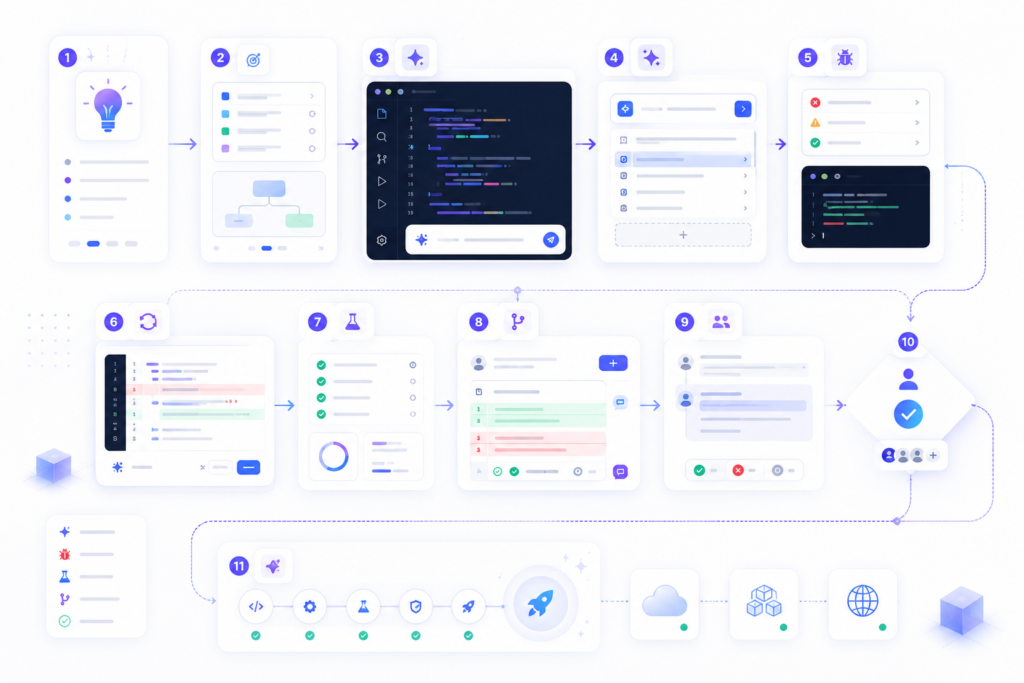
Recommended AI Coding Workflow
The best results usually come from combining AI coding assistants into a workflow instead of relying on one tool for everything.
- Use GitHub Copilot, Cursor, or JetBrains AI Assistant for daily coding
Generate functions, autocomplete code, explain errors, and refactor small sections. - Use Claude Code or OpenAI Codex for deeper coding tasks
Handle larger changes, terminal workflows, debugging, and multi-file edits. - Use Replit Agent or Devin Desktop for prototypes and app builds
Move from idea to working app faster with cloud agents and development environments. - Use Qodo for pull request review and code quality
Review changes, identify risk, generate tests, and improve code before merging. - Run tests and review manually
Never publish AI-generated code without testing, security checks, and human review.
How To Choose The Right AI Coding Assistant
Choose an AI coding assistant based on your workflow, not only the brand name.
If you use GitHub every day, start with GitHub Copilot. If you want an AI-first editor, compare Cursor and Devin Desktop / Windsurf. If you work mostly in the terminal, Claude Code may fit better. If you use JetBrains IDEs, JetBrains AI Assistant is the natural starting point. If your team cares about privacy and enterprise controls, compare Tabnine and Qodo.
Before choosing, check IDE support, repository context, privacy settings, SSO, audit logs, team controls, usage credits, model access, token limits, and whether the tool can work with your real codebase.
Best AI Coding Assistants By Use Case
Best AI Coding Assistant for VS Code
GitHub Copilot, Cursor, Claude Code, OpenAI Codex, and Qodo are strong options for VS Code users. Copilot is the safest starting point, while Cursor is better for AI-native editing.
Best AI Coding Assistant for JetBrains
JetBrains AI Assistant, GitHub Copilot, Claude Code, Tabnine, and Qodo are strong options for IntelliJ, PyCharm, WebStorm, and other JetBrains IDEs.
Best AI Coding Assistant for Beginners
Replit Agent, GitHub Copilot, Cursor, and OpenAI Codex are useful for beginners because they help explain errors, generate starter code, and guide simple projects.
Best AI Coding Assistant for Teams
GitHub Copilot, Tabnine, Qodo, JetBrains AI Assistant, and Devin Desktop are better for teams because they support collaboration, code review, admin controls, and enterprise workflows.
Best AI Coding Assistant for Privacy
Tabnine, Qodo, JetBrains AI Assistant, and enterprise versions of GitHub Copilot are stronger options when privacy, SSO, audit logs, and private repository controls matter.
Related AI Coding Reviews
Keep these as plain text until the review pages are published:
- GitHub Copilot Review
- Cursor Review
- Claude Code Review
- OpenAI Codex Review
- JetBrains AI Assistant Review
- Tabnine Review
- Replit Agent Review
- Amazon Q Developer Review
- Qodo Review
- Devin Desktop / Windsurf Review
Related AI Coding Comparisons
Keep these as plain text until the comparison pages are published:
- GitHub Copilot vs Cursor
- GitHub Copilot vs Claude Code
- Cursor vs Devin Desktop
- Cursor vs Windsurf
- Cursor vs Claude Code
- Claude Code vs Codex
- OpenAI Codex vs GitHub Copilot
- Tabnine vs GitHub Copilot
- JetBrains AI Assistant vs GitHub Copilot
- Replit Agent vs Cursor
- Amazon Q Developer vs GitHub Copilot
- Qodo vs CodeRabbit
Related AI Coding Alternatives
Keep these as plain text until the alternative pages are published:
- GitHub Copilot Alternatives
- Cursor Alternatives
- Windsurf Alternatives
- Devin Alternatives
- Claude Code Alternatives
- OpenAI Codex Alternatives
- Tabnine Alternatives
- JetBrains AI Assistant Alternatives
- Replit Agent Alternatives
- Amazon Q Developer Alternatives
- Qodo Alternatives
FAQs About AI Coding Assistants
What are AI coding assistants?
AI coding assistants are tools that help developers write, explain, debug, refactor, test, and review code using artificial intelligence.
How do AI coding assistants work?
AI coding assistants use large language models, codebase context, IDE integrations, and prompts to suggest code, explain errors, refactor files, write tests, and review pull requests.
What is the best AI coding assistant?
GitHub Copilot is the best overall starting point for most developers. Cursor is better for AI-first editing, Claude Code is strong for terminal workflows, and Qodo is useful for code review.
What is the difference between AI code completion and AI coding agents?
AI code completion suggests code while you type. AI coding agents can handle larger tasks, edit multiple files, run commands, create pull requests, and work across more of the software development workflow.
Can AI coding assistants write full applications?
Some AI coding agents can help build full applications, especially tools like Replit Agent, Devin Desktop, Cursor, and Codex. Human review is still required for architecture, security, testing, and deployment.
Can AI coding assistants debug code?
Yes. AI coding assistants can explain errors, suggest fixes, inspect code, and help generate tests. They should not replace proper debugging, logging, and manual review.
Are AI coding assistants safe for private code?
They can be safe when configured correctly, but teams should review privacy settings, data retention, repository access, SSO, audit logs, and enterprise controls before using them with private code.
Can AI coding assistants replace developers?
No. AI coding assistants can reduce repetitive work and speed up development, but developers still need to make decisions about logic, architecture, security, testing, performance, and product requirements.
Are free AI coding assistants worth using?
Yes. Free plans are useful for testing code completion, chat, and basic workflows. Paid plans usually unlock higher limits, better models, team features, agent workflows, and enterprise controls.
Final Recommendation
For most developers, start with GitHub Copilot or Cursor. Use GitHub Copilot if you want a reliable AI coding assistant that works across common developer workflows. Use Cursor if you want an AI-first editor with stronger agentic coding features.
For deeper reasoning and terminal work, add Claude Code. For ChatGPT-based coding tasks, use OpenAI Codex. For code review and quality workflows, use Qodo. For privacy-focused teams, compare Tabnine and enterprise AI coding platforms. For AWS developers, Amazon Q Developer is the most relevant option.
The strongest AI coding setup is not one tool. It is a workflow: use one assistant for daily coding, one for deeper debugging, one for code review, and always test before shipping.